How to Trace Complex Flows
Jesse Reitz, Founder of Docucodes |
Join the Mission to Fix Documentation
We are building DocuCodes to eliminate the knowledge tax for engineering teams everywhere. Sign up now to be among the first to help us shape the future of software documentation.

Stop me if this sounds familiar:
This morning you picked up a ticket that seemed simple: it only has 1 story point, agreed on by your entire team during last week's grooming. The problem is, you just joined the team last month; you've never looked at this part of the codebase before.
"Easy enough," you think. "I'll just take a look at an existing pattern." But oh, no, the "existing pattern" is actually twelve different patterns written across four years and 10 developers. Which one is current? Was the most recent following best practices or did that dev just copy the very first iteration?
You pick an implementation that seems recent and clean enough. You start reading and clicking through to referenced pieces of code; absorbing the logic from the entry point through to the database calls and back again. But wait, this logic actually requires making requests to the "reckoning" service (aka, the auth service); the "storinator" service (aka, an S3 wrapper service); the "doodad" service (I mean, who even comes up with these names?); and the "ultimate-do-it-all" service (what are microservices again?). That's a lot of context (and weird names!) to keep in your head.
Now it's the end of the day. You've spent all day "click(-ing) to definition" through numerous interfaces, modules, and packages. You've jumped across four different repositories hosting your team's microservices. You've read so much code you don't even remember which code calls which services or where you started. Worst of all, you still don't know where you need to start implementing your 1-point feature.
The kicker? You ask the principal engineer who wrote the service what it actually does and they reply, "I don't actually remember; I'd have to look at the code."
Sound familiar?
Code Spelunking
In every job I have ever had as a software engineer I have experienced some variation of this problem: I need to implement a new feature or augment/debug an existing one but before I can do so I need to understand how the thing actually works. Existing documentation, diagrams, pull request comments, and Jira tickets can only get me so far; I need to trace the logic through the codebase to understand where and how I need to make changes.
Sometimes I call this activity "code spelunking" (as in cave exploring). Nowadays, though, I usually call it "tracing the code."
Junior devs are often told it is more important to learn how to read code than it is to write code. I think this is often said at a micro level: what does the variable i represent here? However, I would argue it's even more important to understand how a broader flow of code fits into the codebase as a whole: what series of events does clicking button A trigger; what endpoints are hit, what messages are produced, what state is modified? If you get good at understanding this you'll be able to pick up any codebase you find yourself working in.
The Process
I generally find myself using two broad techniques:
- top-down: find an entry point and trace down through all the paths the code can take.
- bottom-up: start from the code actually causing an effect and trace it back up to find which code paths are calling it.
Functionally-speaking, these techniques are two sides of the same coin. The actual process for tracing the logic of a flow is essentially the same. The main difference is where you start that tracing. Both approaches can make use of your IDE/code editor or can be done via a repository hosting platform such as GitHub.
Top-Down
The top-down approach is generally good for onboarding or exploring completely unfamiliar code paths (eg. cases like I described in the intro). An entry point here can mean:
- Route controllers in a REST API
- Plain-old function calls
mainfunctions or similar (eg.public static void mainin Java, amain.pyorapp.pymodule in Python, etc.)
Once you have identified your entry point, you can start tracing function calls, imports, and API requests to other services. Pretty much any modern IDE or code editor will have a "Go to Definition" function; simply right-click on the function, object, or variable you want to inspect and click "Go to Definition."
Bottom-Up
The bottom-up approach is great for refactoring, debugging, and generally finding issues with code. You start with a known effect and find all code that causes it. An effect here can mean:
- state change (eg. in a database, file upload)
- log message
- call to an external API
Similarly to the top-down approach, once you have identified the effect you wish to trace, you can use IDE and code editors' support for finding references to a given variable, function, or method. Right click on the code for which you want to find usages and click "Find all references," "Find Usages," or something similar. That will show you all the places from which that particular piece of code is called.
Pulling It Together
Being able to trace logic through code is all well and good. However, the real superpower is to absorb that context and use it later to:
- plan future changes
- diagnose critical bugs or issues
- and provide important insight to stakeholders regarding current implementations and proposed changes
It's not enough to read through the code and remember where things are or what pieces of code calls which functions. For one thing, you're likely to switch contexts multiple times per day, effectively resetting your mental "RAM" every time you do so. The cost of this context switching accumulates throughout the day, week, and dev cycle. For another, unless the rest of your team also just traced the same bit of logic as you, they won't have that context during discussions. So how do you ensure that context is maintained between tracing sessions and shared with your team during discussions?
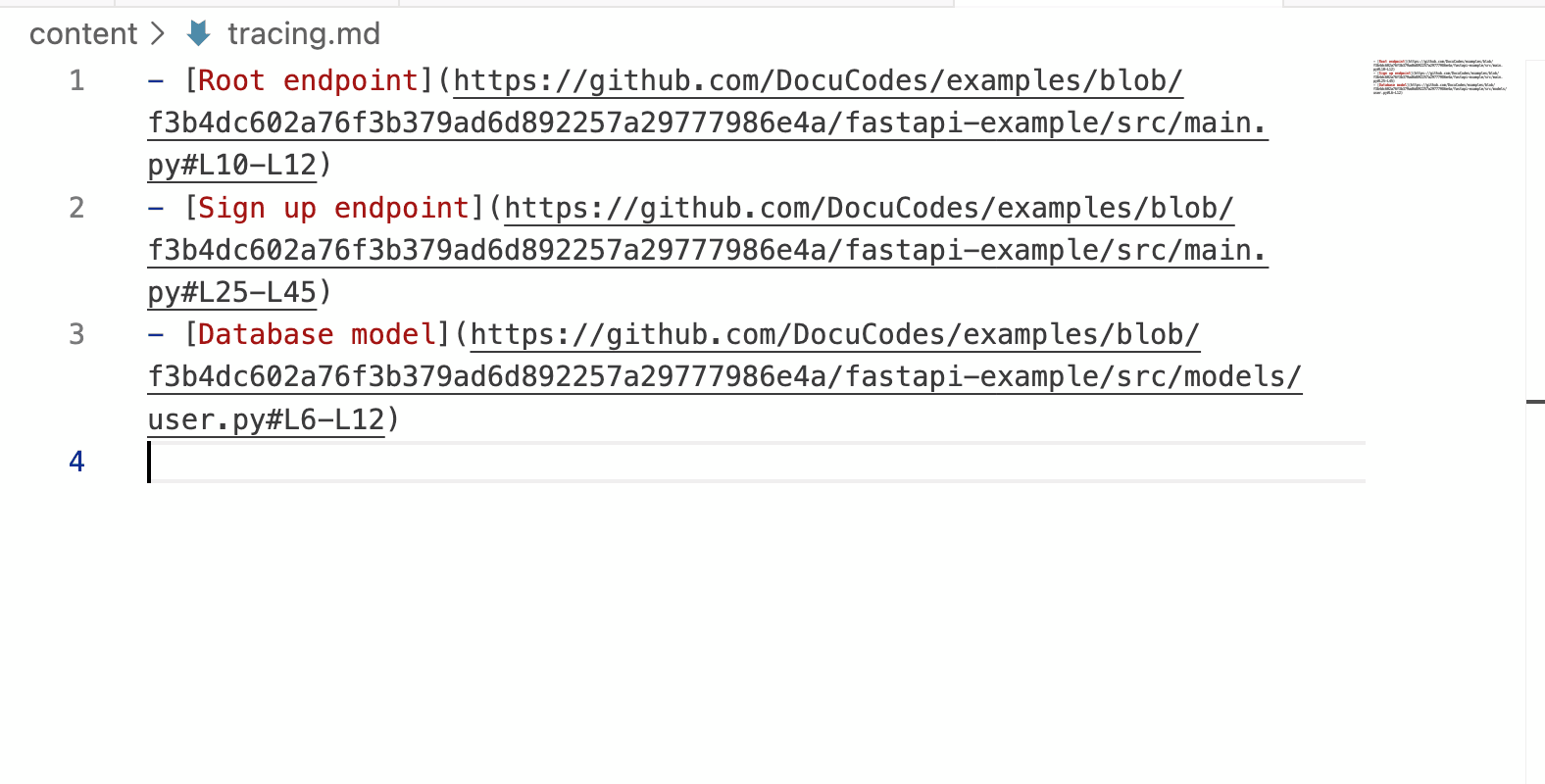
The most common way I have seen people keep their context straight is by creating a list of links to GitHub or another repository listing service. This list of links can be housed in a simple markdown or text document, a Notion or Confluence doc, or even a Slack thread. Regardless of the method, by adding context to each link or reference to code, you can quickly build a powerful piece of documentation that illustrates the why just as much as the how when it comes to the flow of logic through a codebase. Creating these walkthroughs decreases mental load by allowing you to offload some of that context into a more permanent storage solution. Think of it as flushing data from RAM to disk.
But wait, another problem!
So now you have a list of links along with some context about specific points along a code path. That's great! It's an extremely helpful tool as you talk about and work on code.
There's a problem, though: you have a list of links. What are those links? Where do they point? Are they pointing to the right bits of code? Are they, themselves, providing any value?
Basically, the problem is that, while you have the context around the code, the actual code is still a click away. You have to switch tabs or windows before you can actually see what the context is referencing.
The "Link List" Bottleneck
Even with a nice doc complete with a list of links to specific bits of code on GitHub, you’re still fighting a losing battle against cognitive load. Every time you click a link, you’re forced to switch tabs, wait for the repository to load, and then orient yourself to the specific line of code. By the time you’ve navigated back to your notes to remember why you were looking at that file, your mental "RAM" has already started to clear.
The problem isn't that you lack information—it’s that the information is decoupled from the code itself. You have context in one window and code in the other, and the space between the two is where productivity goes to die.
DocuCodes to the Rescue
I built DocuCodes to solve this exact frustration. I wanted a way to leave "breadcrumbs" for myself that didn't require a dozen open tabs to follow.
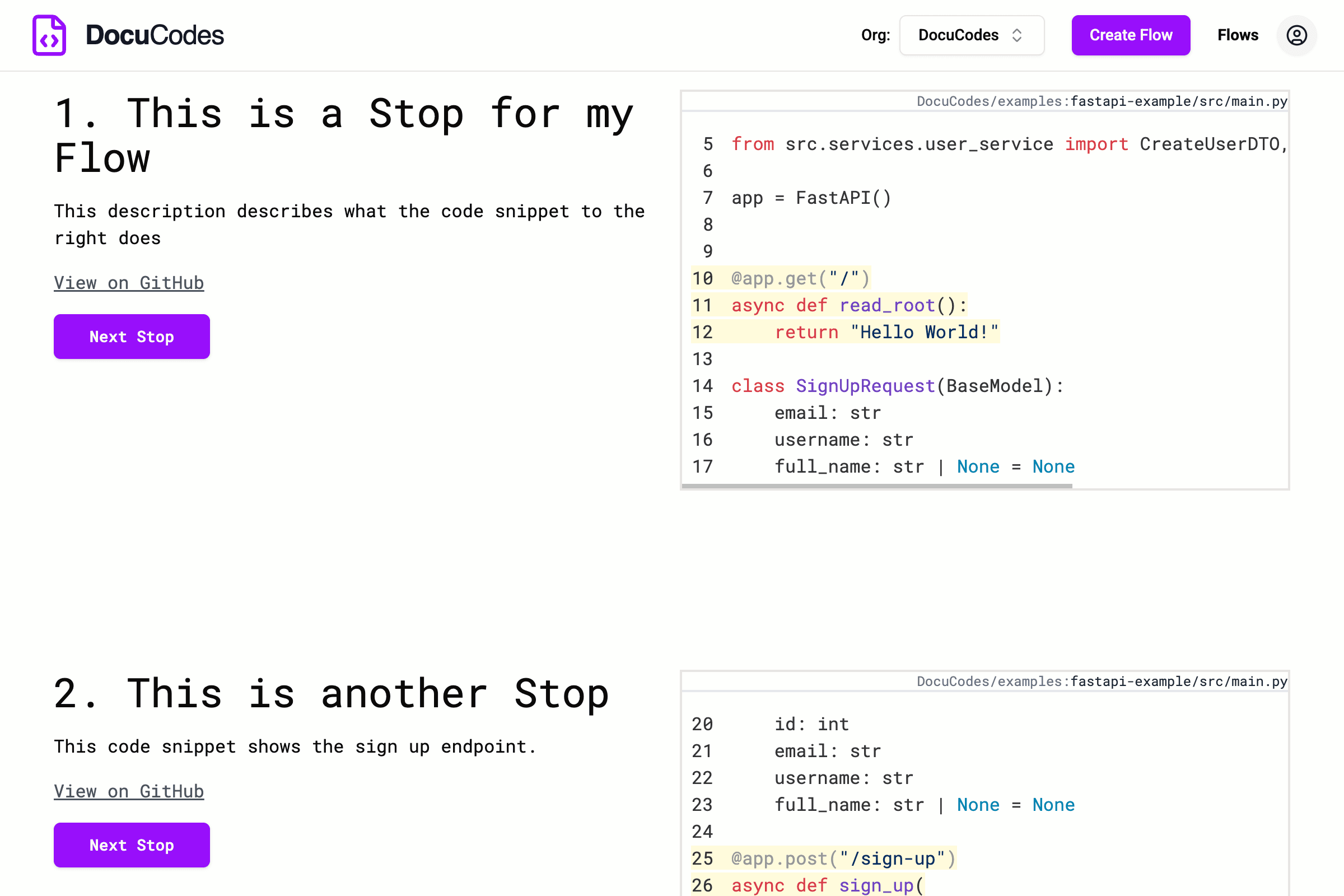
The core of DocuCodes is Flows: interactive walkthroughs that bring code and context together into a single, side-by-side view. Instead of a static list of links, a Flow allows you to:
- View Code and Context Side-by-Side: No more tab-switching; the explanation sits directly next to the logic it describes.
- Trace Across Boundaries: Create walkthroughs that span across different files, multiple repositories, and even across multiple git commits or branches.
- Share the Journey: Instead of sending a teammate a list of disjointed GitHub links, you can send them a single Flow that guides them through the logic exactly as you traced it.
Have a Slack thread with a million links to GitHub after debugging an incident? Chuck those links into a DocuCodes Flow to use during the post-mortem.
Working on a new part of the codebase? Create a Flow to trace the current standard and save it for when you're ready for implementation or to help others work in the same part of the codebase.
By keeping the "how" and the "why" in the same frame, you can stop spelunking and start implementing. Whether you’re trying to regain your own context after a weekend away or onboarding a new hire to a "doodad" service they’ve never seen, DocuCodes ensures the context is always right where the code is.
Documentation isn’t just a favor for the next person who joins the team. It’s a gift to your future self for six months from now, when you’ve inevitably forgotten why you built that "doodad" service the way you did. Don't leave your future self (or your team) in the dark.
Join the Mission to Fix Documentation
We are building DocuCodes to eliminate the knowledge tax for engineering teams everywhere. Sign up now to be among the first to help us shape the future of software documentation.